Twoje centrum dowodzenia eventemYour event command center
Wizualna przestrzeń robocza 2D z nieskończonym zoomem. Agenda, prelegenci, bilety, notatki i zadania — wszystko w jednym widoku.A visual 2D workspace with infinite zoom. Agenda, speakers, tickets, notes and tasks — everything in a single view.
Zaplanuj swój eventPlan your eventCanvas EventowyEvent Canvas
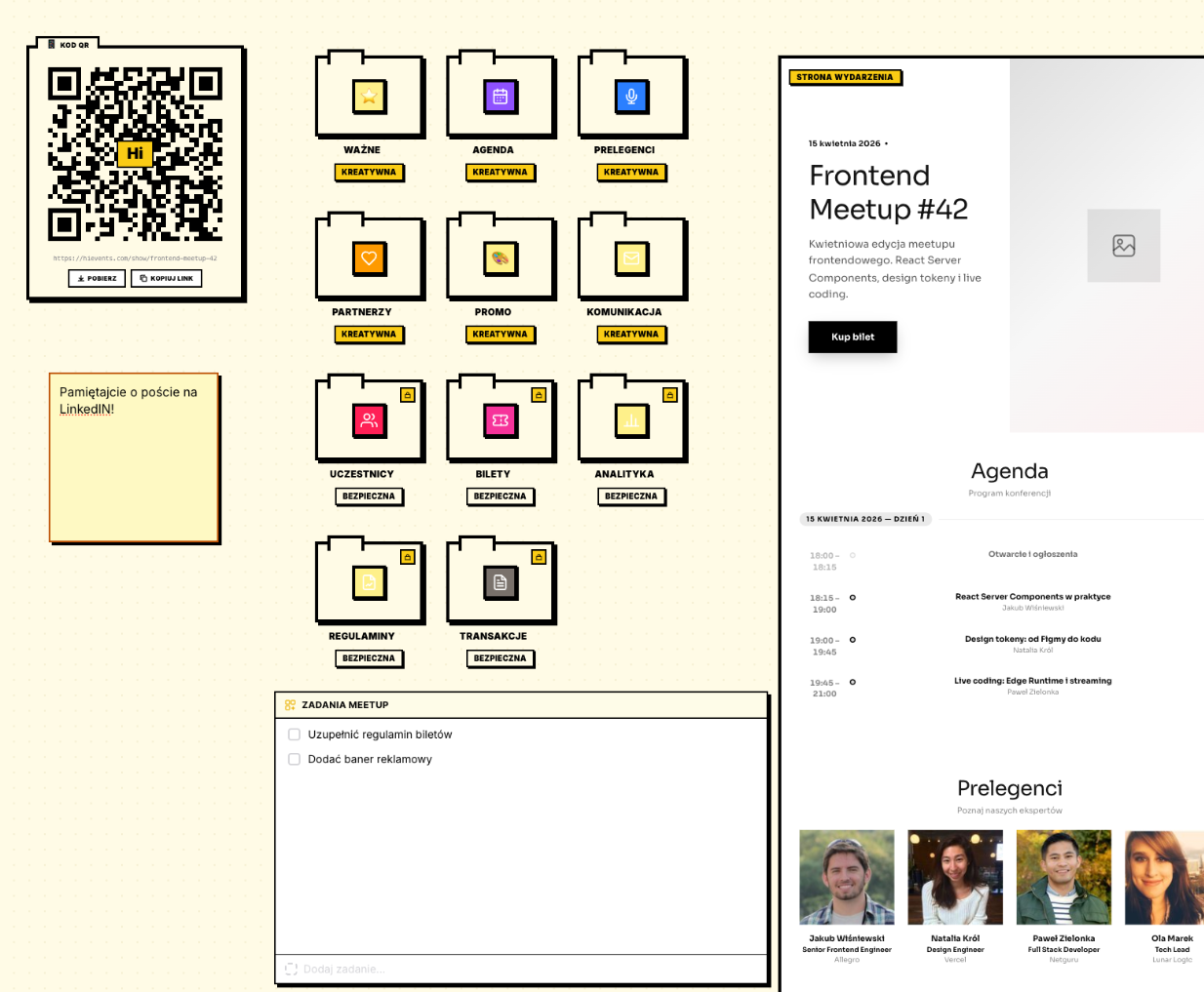
Canvas zbiera wszystko w jednym miejscu — teczki tematyczne, karteczki post-it, listę zadań i podgląd strony na żywo, które przesuwasz i powiększasz jak na biurku.The canvas gathers everything in one place — themed folders, post-it notes, a task list and a live page preview that you pan and zoom like a real desk.
Co zyskujeszWhat you get
Organizacja eventu rozjeżdża się po arkuszach, mailach i dokumentach. Trudno ogarnąć całość i nic nie umyka.Event organization scatters across spreadsheets, emails and docs. It’s hard to see the whole picture and keep nothing slipping.
Canvas zbiera wszystko w jednym miejscu — teczki tematyczne, karteczki post-it, listę zadań i podgląd strony na żywo, które przesuwasz i powiększasz jak na biurku.The canvas gathers everything in one place — themed folders, post-it notes, a task list and a live page preview that you pan and zoom like a real desk.
Od zera do gotowegoFrom zero to done
Otwórz eventOpen the event
Domyślny układ teczek czeka gotowy do pracy.A default folder layout is ready to go.
Przesuwaj i powiększajPan and zoom
Nawiguj po nieskończonym canvasie — wszystkie moduły eventu w jednym widoku.Navigate the infinite canvas — all your event modules in one view.
Pracuj z zespołemWork with your team
Notatki, zadania i podgląd strony w jednym miejscu.Notes, tasks and the page preview in one place.
- Teczki: Agenda, Prelegenci, Partnerzy, Bilety, KomunikacjaFolders: Agenda, Speakers, Partners, Tickets, Communication
- Karteczki post-it i lista zadańPost-it notes and task lists
- Podgląd strony na żywoLive page preview
- Menu kontekstowe (prawy klik)Context menu (right-click)
- Nieskończony canvas: przesuwanie i zoomInfinite canvas: pan & zoom
- QR kod z linkiem do strony eventuQR code with event page link
Najczęstsze pytaniaFrequently asked
Czy muszę umieć projektować, żeby korzystać z canvasu?Do I need design skills to use the canvas?
Nie. Canvas to wizualne biurko — korzystasz z gotowych modułów, nic nie kodujesz ani nie projektujesz.No. The canvas is a visual desk — you work with ready-made modules, with no coding or designing.
Czy zespół może pracować na tym samym evencie?Can my team work on the same event?
Tak, z rolami i uprawnieniami. Notatki i zadania widzi cały zespół.Yes, with roles and permissions. Notes and tasks are visible to the whole team.
Co to jest kod QR na canvasie?What is the QR code on the canvas?
Automatyczny kod QR kodujący adres publicznej strony eventu — gotowy do pobrania.An automatic QR code encoding your public event page URL — ready to download.
Powiązane funkcjeRelated features
Dostępny we wszystkich planachAvailable on all plans
Gotowy, żeby zacząć?Ready to start?
Zacznij od planu FREE. Zero zobowiązań, zero karty kredytowej.Start with the FREE plan. No commitments, no credit card.
Zaplanuj swój eventPlan your event