
Conference planning without the chaos. 8 problems Hi Events solves
The programme in Excel, sign-ups in a form, speaker bios in four emails. Eight organiser problems and real screens from Hi Events.

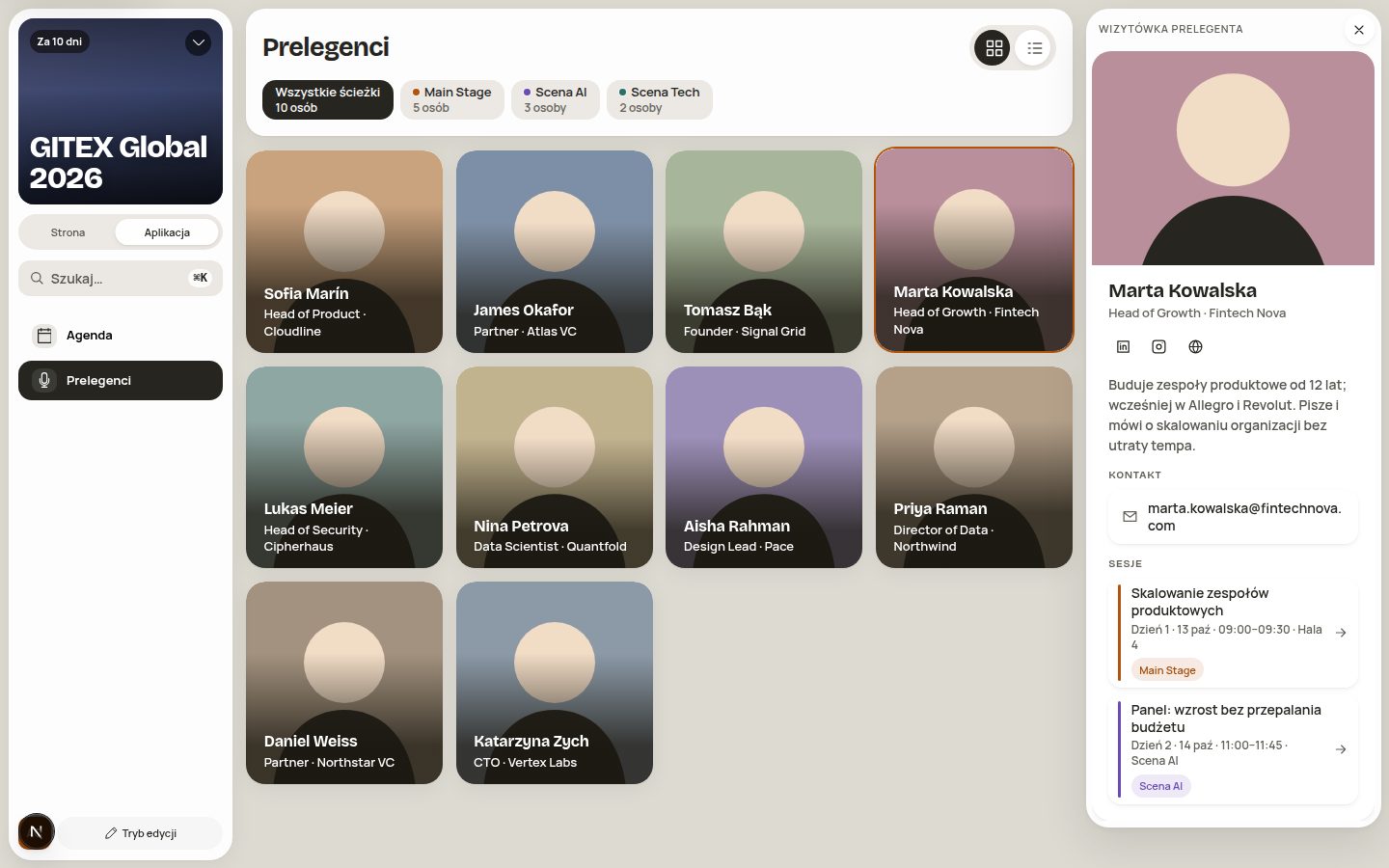
This article is for you if you run conferences, meetups, congresses or company events. We’ll show the eight problems we hear about from organisers most often. With each one you’ll see a real screen from Hi Events. No stock-photo mock-ups and no overpromising.
First, briefly: what is Hi Events
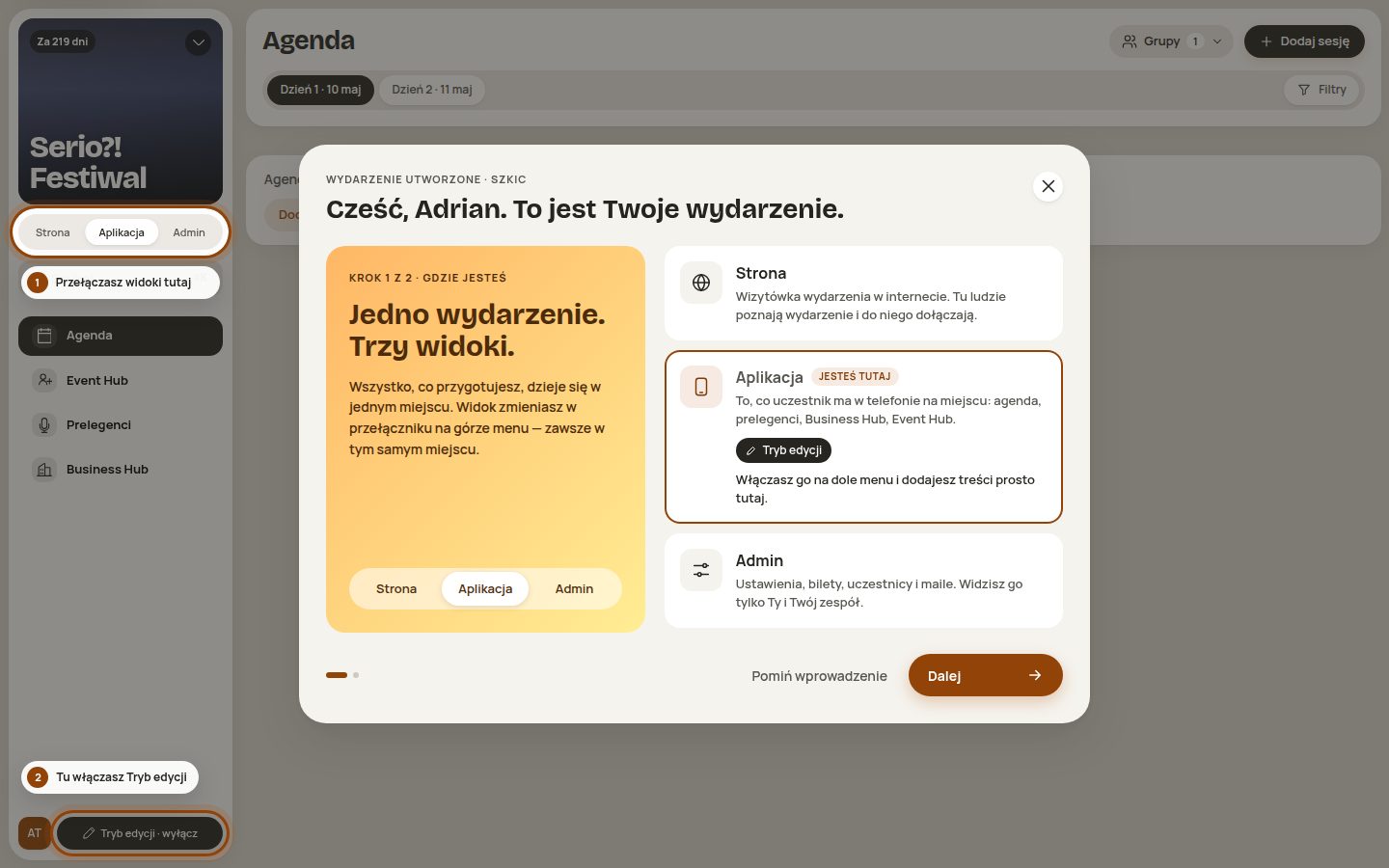
Hi Events is an event platform where one event has three views:
- Website is the event’s website, which anyone on the internet can see.
- App is what attendees have on their phone on site: the agenda, speakers, companies and their own plan.
- Admin is your panel: settings, sign-ups, attendees, emails and your team.
All three use the same data. You change something once, and the change is everywhere.
Behind Hi Events is the Meeting Application team. We’ve been building apps and systems for events for 13 years. Hi Events is a new system, built from scratch on that experience. It’s now in beta.
Problem 1. One event, five tools
The website in a site builder. Sign-ups in a form. The attendee list in a spreadsheet. Emails in a newsletter tool. The programme in a PDF. Each tool has its own password, its own copy of the data and its own way of ruining your afternoon.
The worst part isn’t paying for five tools. The worst part is moving data between them. You copy, paste and check. Then someone changes their surname in the form, and you have two versions of the truth.
You change something once. It shows on the website, in the app and in the email.
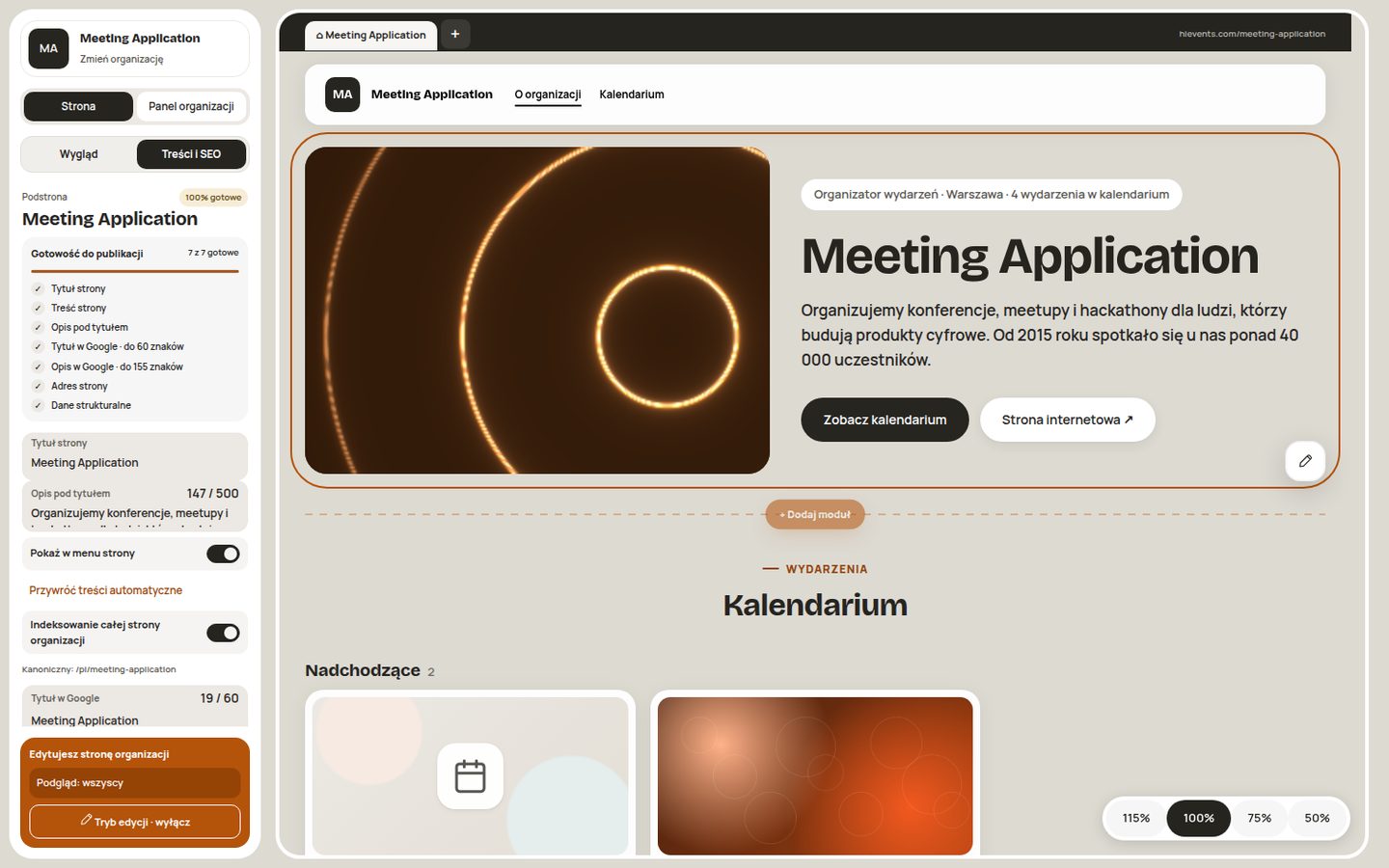
How Hi Events does it. The event website, sign-ups, agenda, speakers, companies and emails live in one place. You edit the website directly in the preview. You click on the text and change it. The agenda and speakers appear on the website by themselves, because they come from the same data as the app. You don’t need a designer or a developer to add an FAQ section or a new page.
Problem 2. A programme that changes every hour
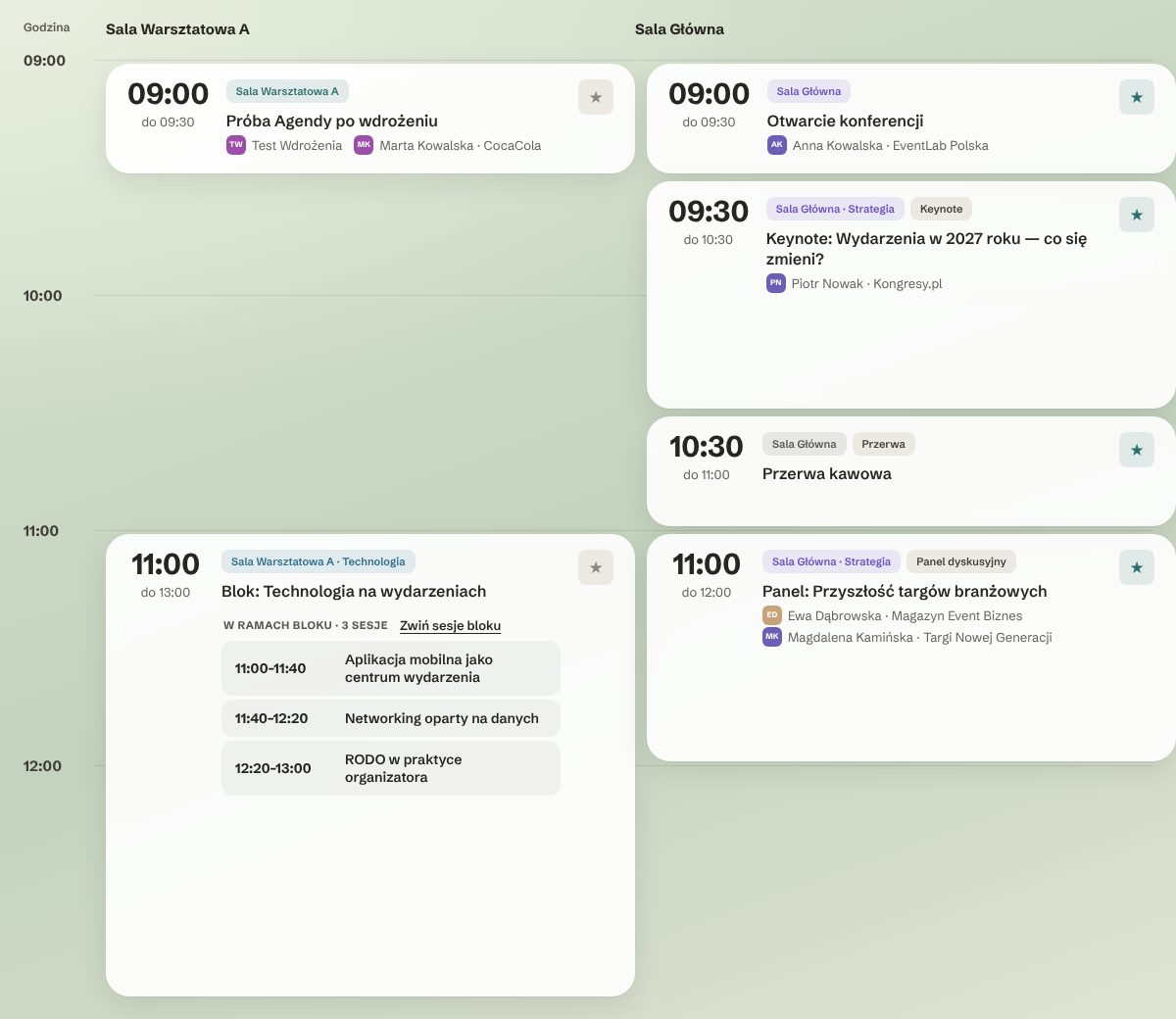
Every organiser knows this one. A speaker is running late, sessions swap places, room B turns out to be too small. The printed programme is out of date before it reaches the tables. And attendees ask in the corridor where the next session is.
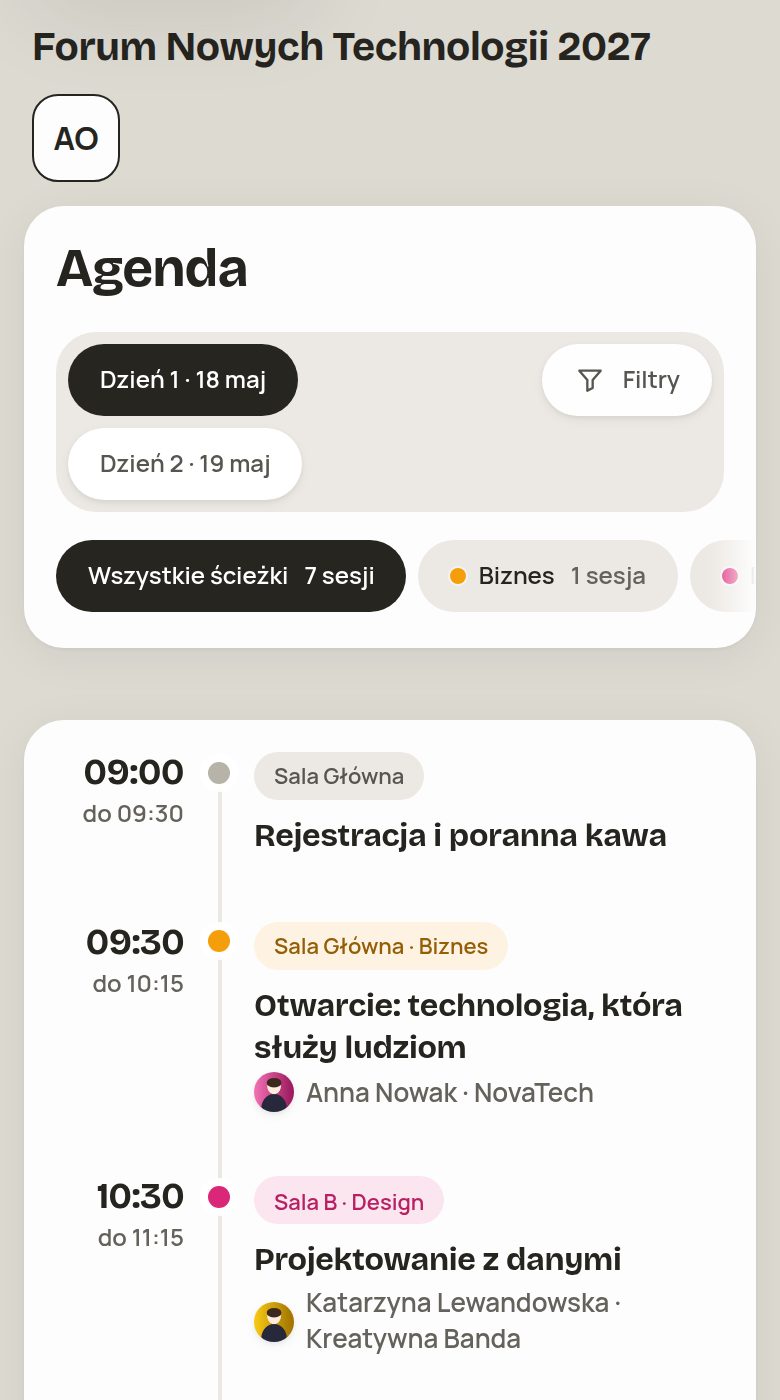
How Hi Events does it. There is one conference agenda. Days, rooms, tracks and tags are all in one view. Attendees filter the programme by what interests them and add sessions to their own plan. When you move a session in the admin panel, attendees see the new time straight away. On the website and on their phone.
On a phone the programme looks the same, just narrower. Days, filters and tracks are right under your thumb.
Problem 3. “Download our app”
Every conference attendee hears this sentence. Then they look for the app in the store, create an account, come up with a password and forget it before day two. Some people never get to the programme at all.
The numbers back this up. In a Clutch survey from April 2026 (476 adults in the US), 80% of people downloaded an app because they had to. 72% were at least slightly annoyed by it. 54% delete such apps right after using them. To be fair: it’s an American survey, and some people still like apps from the store. But being forced to download annoys almost everyone.
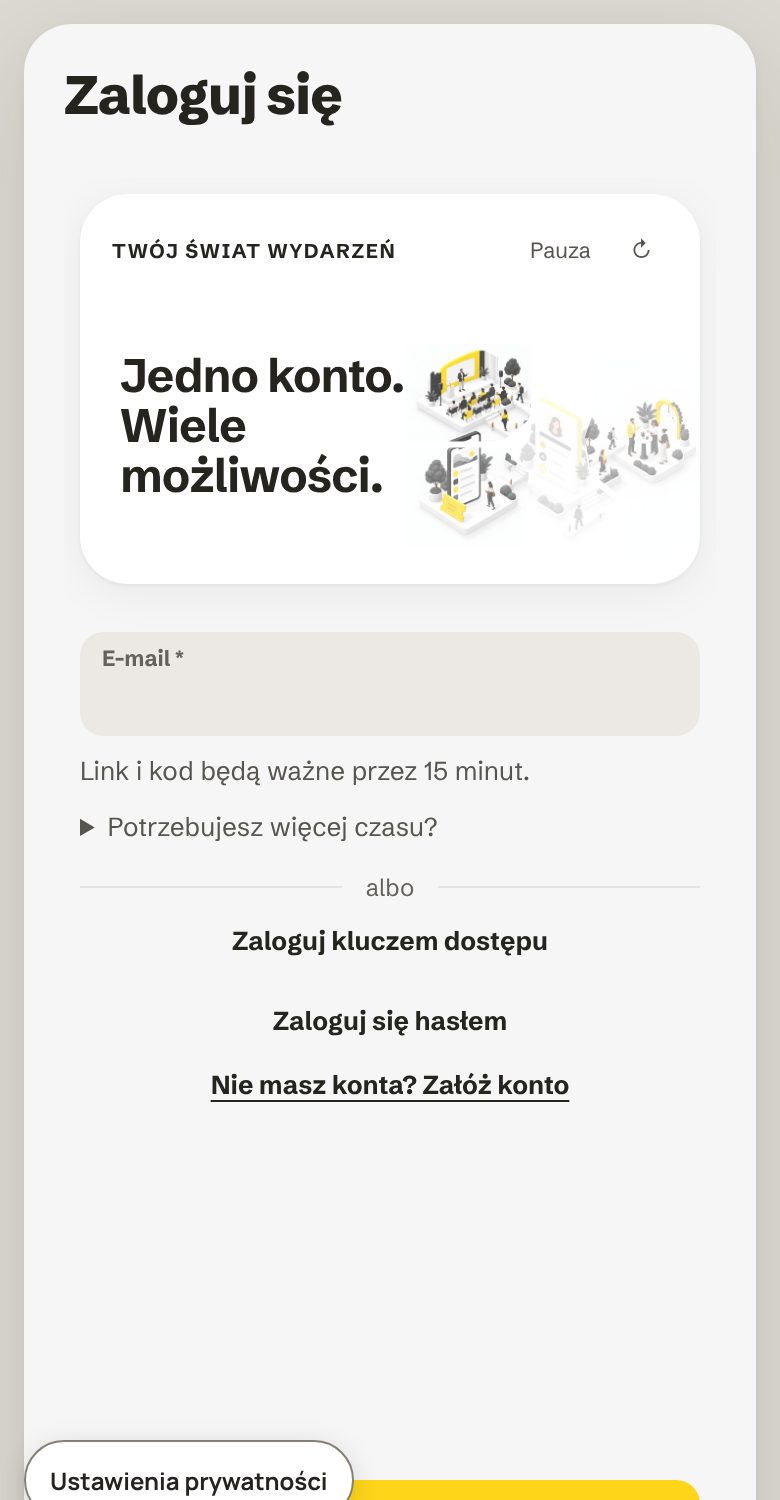
How Hi Events does it. The event app works without installing anything. Attendees open a link on their phone and immediately see the programme, speakers and companies. Everything the organiser has made public. There’s no app store and no password to remember. You log in with a link or a code from your email. If you like, you can also add a passkey and log in with your fingerprint or Face ID.
Problem 4. Sign-ups that scare people off
A long registration form is a good way to lose people. Every field is a reason to close the tab. And having to create an account before signing up is one more hurdle.
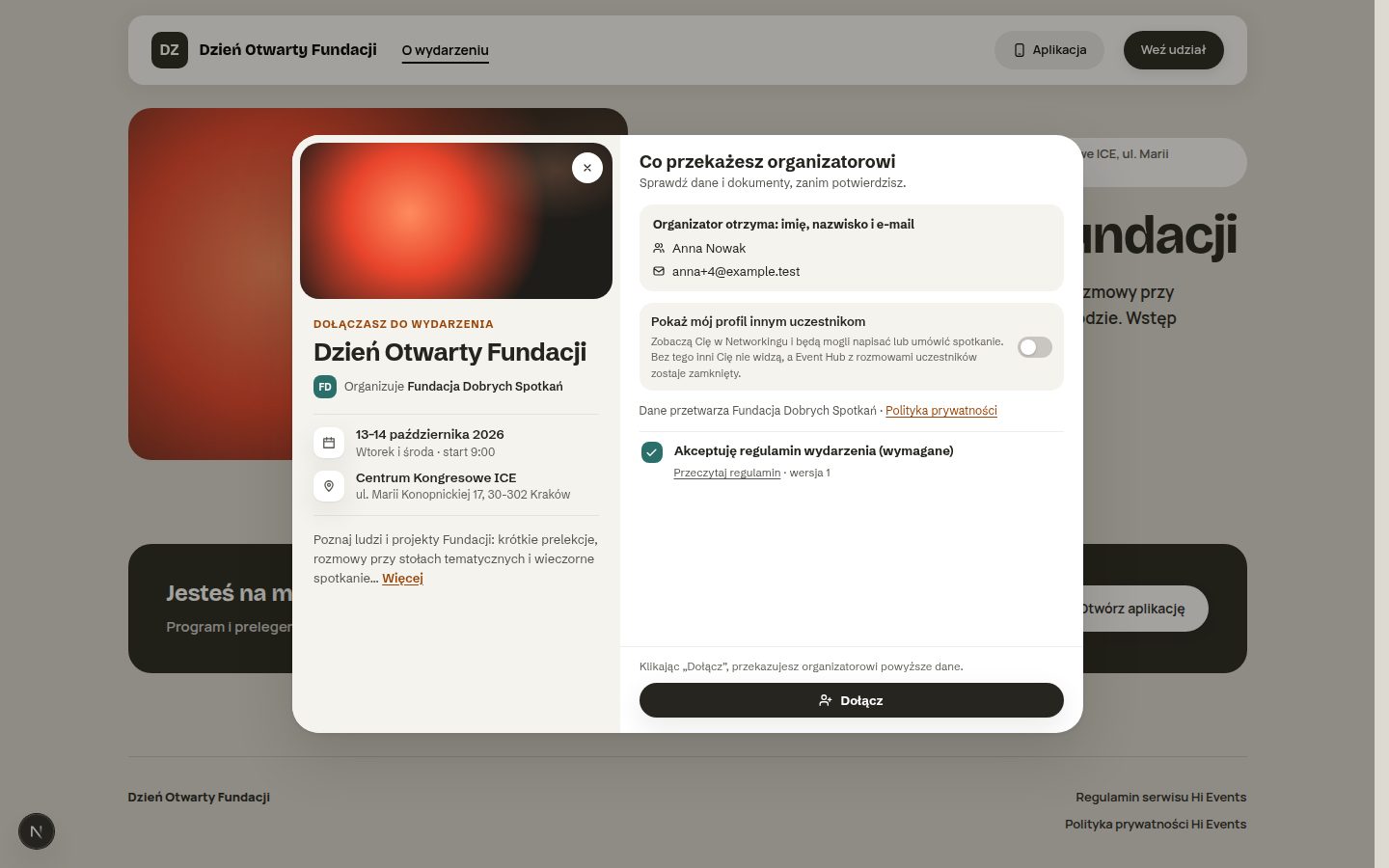
How Hi Events does it. For a free event, signing up takes a few seconds. First name, surname and email are enough. Guests don’t have to create an account. They can create one later, with one click in an email, if they want to.
The details organisers usually don’t see matter too:
- Attendees see in black and white what data the organiser gets.
- The event terms have a version number, and the system records which version someone accepted.
- Attendee profiles are hidden by default. Each attendee decides whether others can see them and message them.
For you, that means fewer abandoned sign-ups. If you sell tickets to different groups, also read One event, many audiences. For attendees, it’s a sense that their data is under control. In the age of GDPR, both matter.
Problem 5. “Bio by email, logo on chat”
Managing speakers often means collecting information piece by piece. The bio arrives by email. The photo through a messenger, at postage-stamp resolution. The slides the day before the event, in three versions. Then you copy everything onto the website and into the app. It’s the same with partner companies and exhibitors, just with more people to chase.
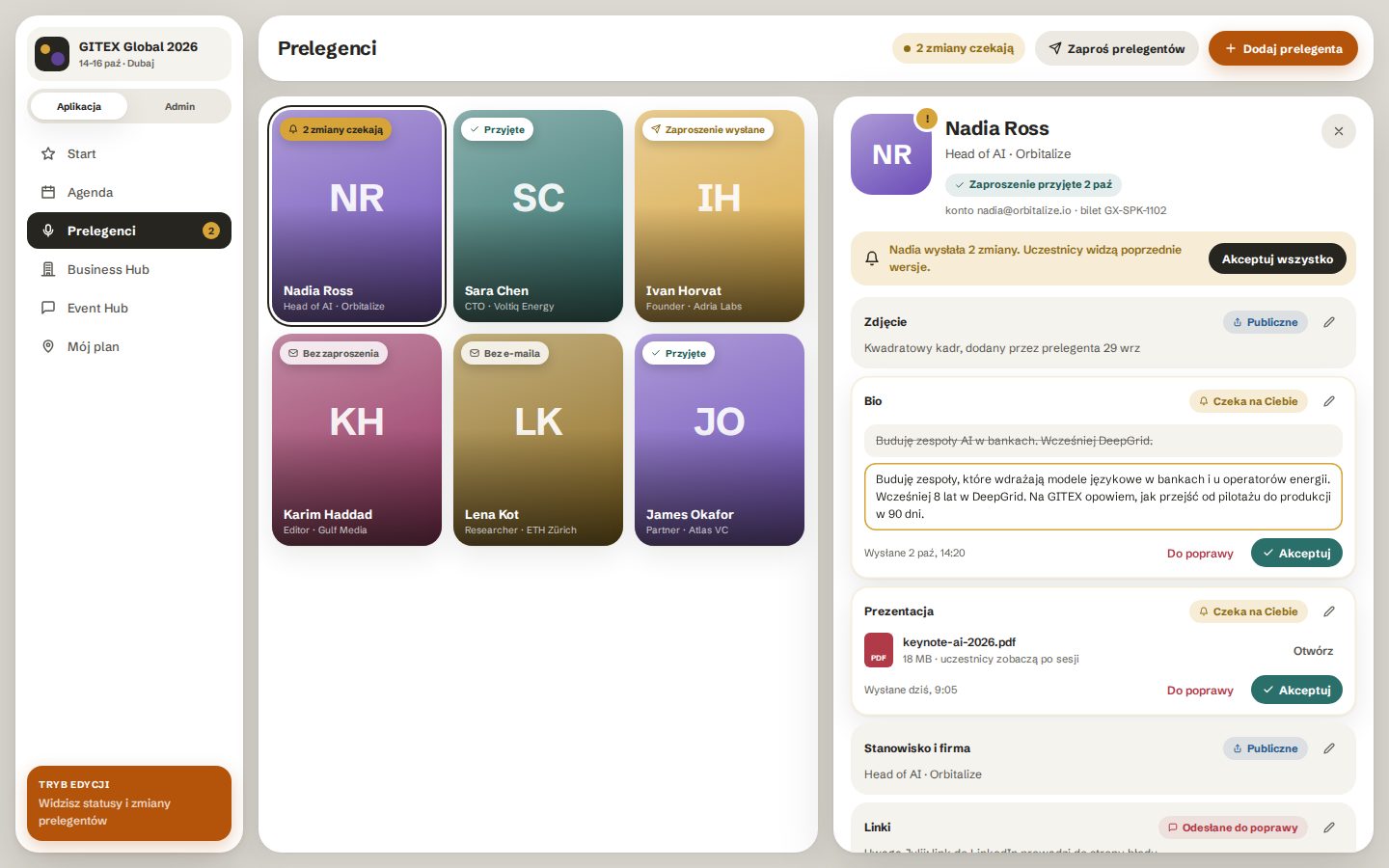
How Hi Events does it. You invite a speaker to the event. The speaker fills in their own profile card: photo, bio, job title, links, slides. Changes don’t go straight to the website. You see them first and decide field by field: accept, or send back for corrections. Attendees see the previous version until you approve the new one.
The Business Hub, the directory of companies at the event, works the same way. Sponsors, partners and exhibitors have their own tiles with categories. Attendees filter companies and save the ones they’re interested in. The owner of a company profile can fill it in themselves, and you approve it.
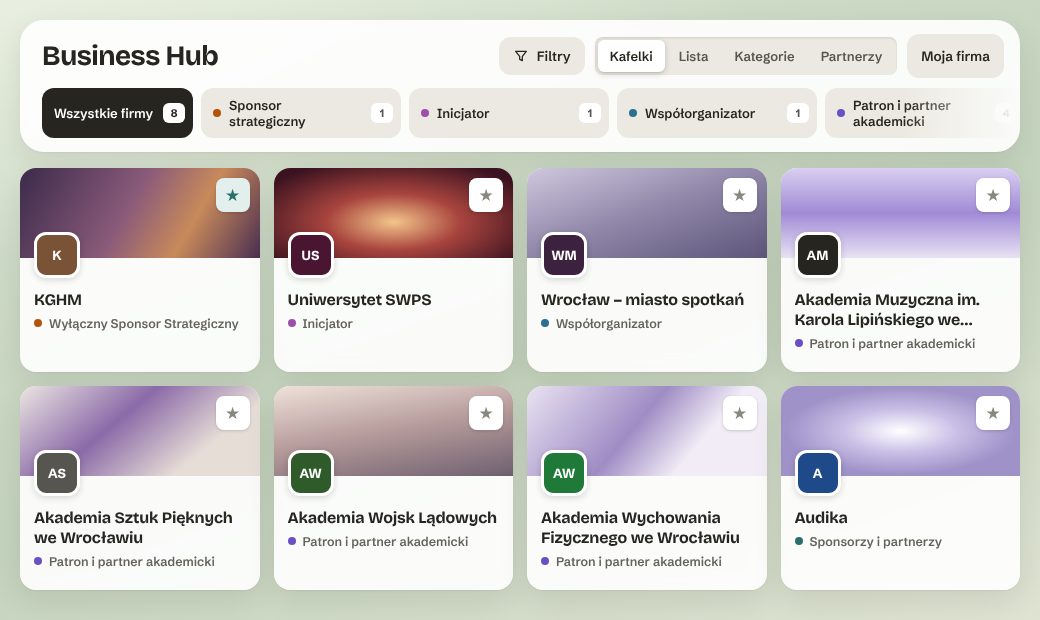
The Agenda, Speakers and Business Hub modules cost PLN 0 in every plan.
Problem 6. Attendees lost on event day
In the morning, attendees have three questions on their mind. Where’s my ticket? What’s happening now? What else do I need to do? Usually the answers are in three different emails.
How Hi Events does it. Every attendee has a Hi Hub, their own dashboard for the event. On it they see what’s on now and what’s next in their plan. They have their entry code, a to-do list (for example, completing their profile), and the speakers and companies they’ve saved. Attendees can arrange the dashboard their own way.
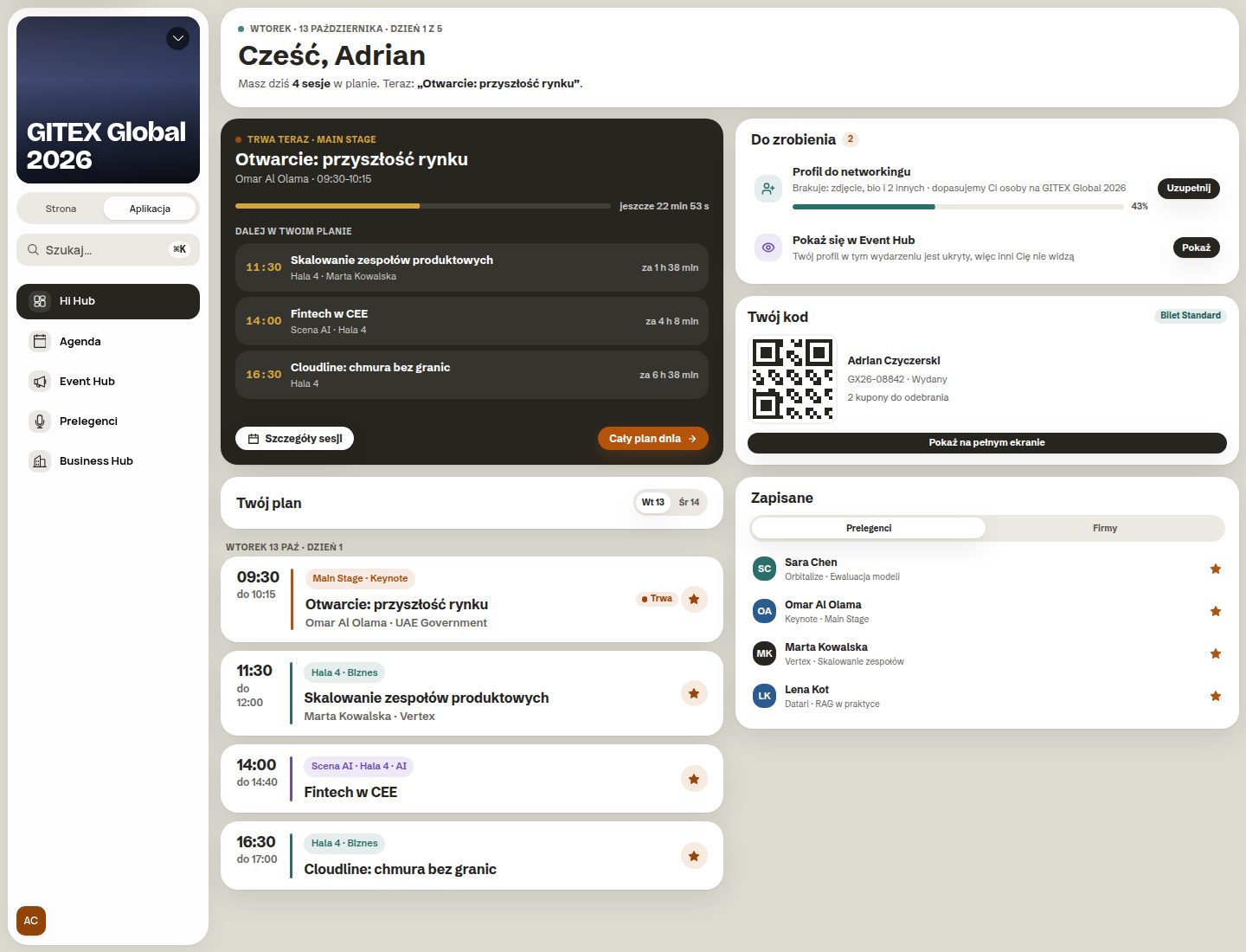
Next to it is the Event Hub: the board and attendee conversations at the event. It’s a good place for organiser announcements and for arranging a coffee between sessions.
Problem 7. Emails written from scratch every time
Sign-up confirmation, a reminder the day before, a programme change, a thank-you after the event. Every event means several emails, and every email means copying the previous one and fixing the dates. And hoping nobody gets an email with someone else’s name.
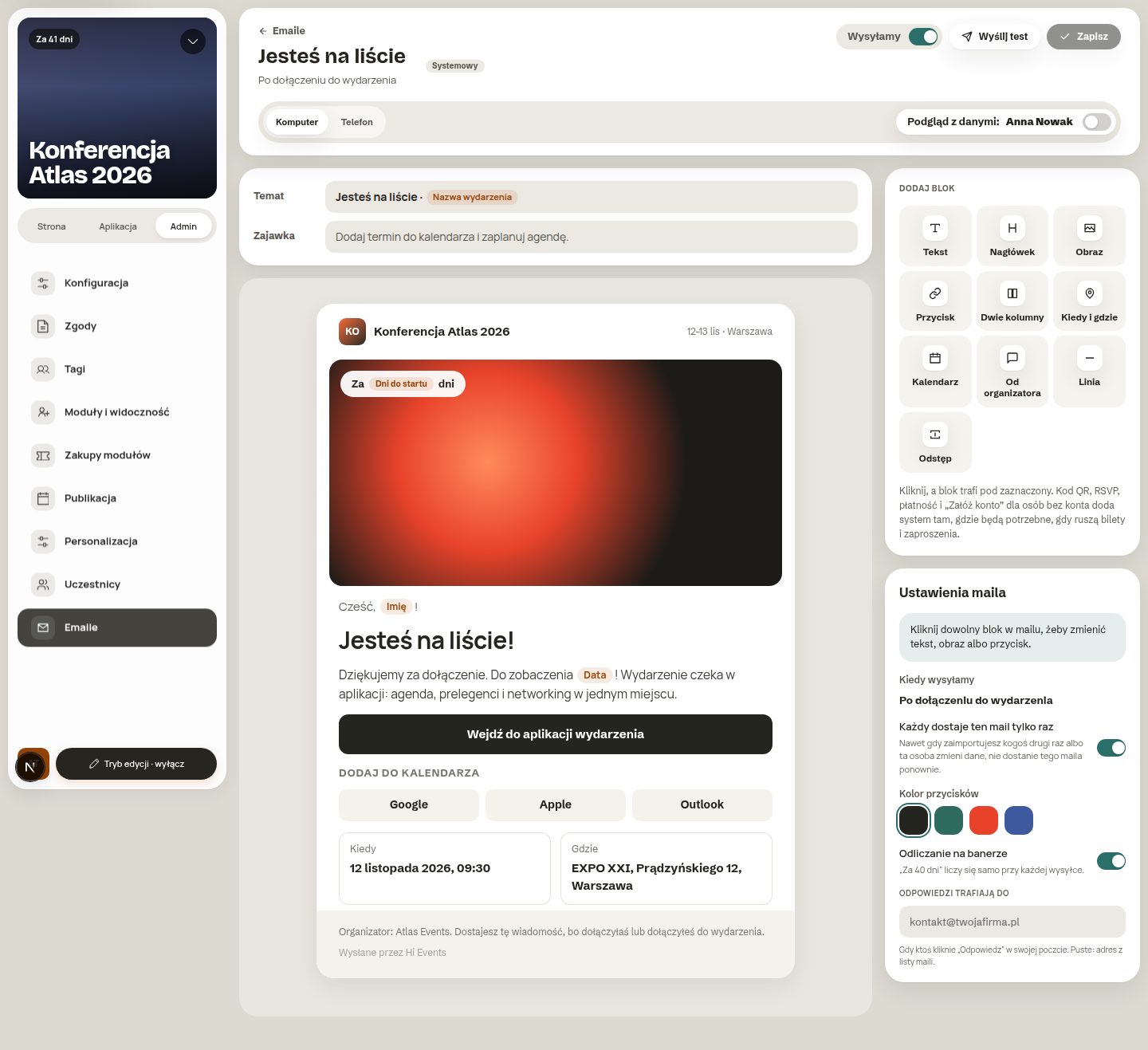
How Hi Events does it. The Emails module has a block editor: text, button, image, add-to-calendar. You set when an email goes out, for example after someone joins the event. The preview shows the email with a real person’s details, on desktop and on a phone. Before sending, you can send a test to yourself.
Problem 8. The next edition, from scratch again
The event ends. Contacts stay in spreadsheets, scattered across folders from previous years. For the next edition you build the database from scratch and don’t know who comes every year and who came once.
How Hi Events does it today. Each attendee has one account for all events. Their profile, plan and saved people don’t disappear after the event. All your events are in one organisation, under one plan and with one team.
How to choose an event platform. Five questions to start with
Whether you choose Hi Events or another attendee registration system, ask the vendor these questions. The answers will quickly show how much work is left on your side.
How much does it cost
For free registrations you pay from PLN 2 net per person. Event drafts cost nothing. Agenda, Speakers and Business Hub are included in every plan, for PLN 0. One organisation plan covers all your events.
Frequently asked questions
Do attendees have to download an app? No. The event app opens from a link in the phone’s browser.
Do attendees have to create an account to sign up? No. For a free event, a first name, surname and email are enough. An account is optional.
Do I need a designer to make an event website? No. You edit the website in the preview, and choose styles, colours and shapes in the Appearance panel.
Who is Hi Events for? For companies, industry organisations, universities and agencies. It works best where there’s more than one event and people come back.
How to get started
Hi Events is in beta now. Go to hievents.com, leave your address in the “Join the beta” section, and we’ll get back to you with access. Once you log in, you can create your first event straight away, as a draft, for free.
One event. Three views. Zero retyping.
Source of the figures: Clutch, “App Fatigue”, April 2026, a survey of 476 adults in the US. The screens come from the Hi Events beta, October 2026.
Read on
All articles →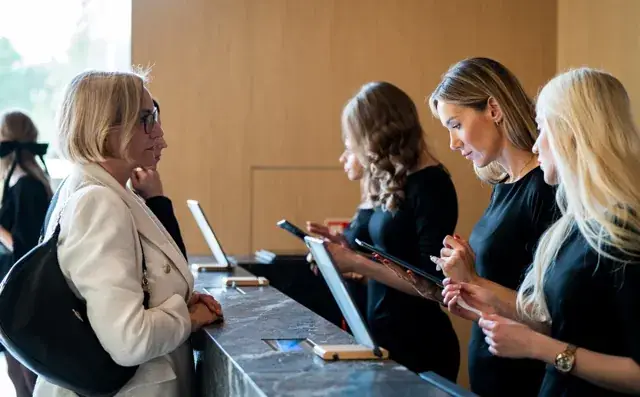 Planning
Conference check-in: how to prepare for welcoming attendees
How to prepare check-in at a conference or trade fair: plan the desks, badges, staff training and how to handle tricky cases at the entrance.
 Community
How to build community between conferences and meetups
How to stay in touch with attendees after a conference: meetup examples, the host’s role and ideas for your first month working with a community.
 What’s new
Why we built Hi Events from scratch
Why did the Meeting Application team create Hi Events? On organisers’ experience, a new brand and joining registration with the event app.